

SR Nav Off Canvas 01
This renders a compact top bar with a logo and a toggle button that opens a full-screen overlay menu containing up to 4 flat nav links (each with an optional numbered marker), an optional search field, and an optional language switcher, plus CTA buttons that show inline on desktop and inside the overlay on mobile.
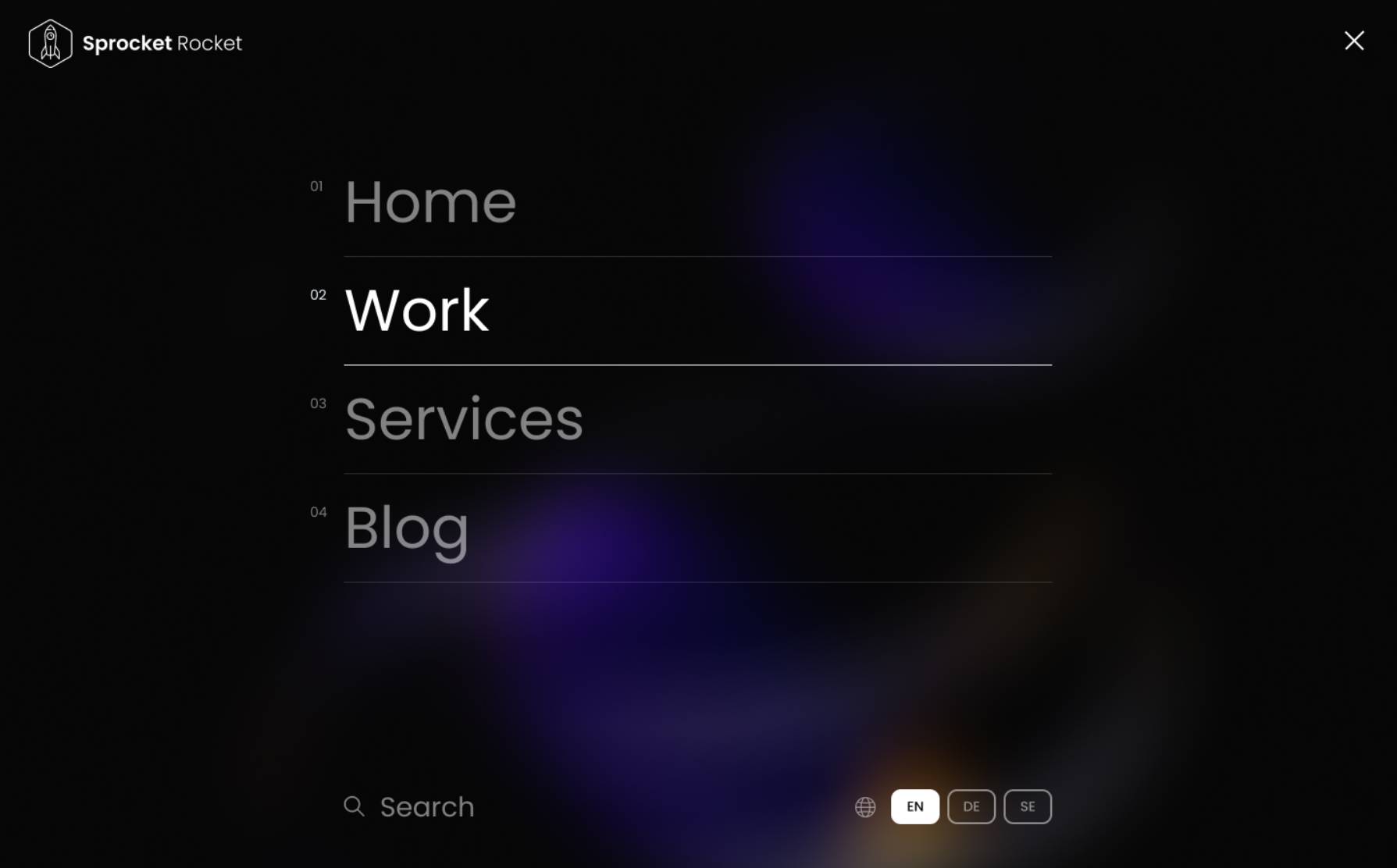
Pick it over SR Nav Min 01 when you need more than just a logo and CTAs, and pick it over SR Navigation 01 when the site has only a handful of top-level links and does not need a top bar, dropdowns, or a mega menu. It expects a small flat link set since the overlay has no nesting and caps out at 4 items.
Use cases
- Full-screen overlay menu
- Minimal header with slide-out nav
- Logo plus toggle button navigation
- Numbered link overlay menu
- Header with search and language switcher
- Clean nav for small site with few pages
Where it fits
- Included with: PRO
- Page sections: Navigation
Editable fields
Content tab
| Field | Type | Notes |
|---|---|---|
| Enable Language Switcher | Boolean | By adding a language switcher you can allow your visitors to select their preferred language. Custom multi-language content will not be translated automatically. Learn More. |
Settings
| Field | Type | Notes |
|---|---|---|
| Layout | Choice | Options: Default, Small, Large, Full Width. |
| Fixed | Boolean | |
| Mobile Breakpoint | Number | Breakpoint at which the navigation layout changes to the mobile view. |
| Max Width | Number | Maximum width at which the navigation overlay container will be set at. |
Logo
| Field | Type | Notes |
|---|---|---|
| Logo Default | Image | |
| Logo Link | Link |
Menu
| Field | Type | Notes |
|---|---|---|
| Show Numbers | Boolean |
Menu › Nav Link Repeats: min 1, default 4.
| Field | Type | Notes |
|---|---|---|
| Link Name | Text | |
| Link | Link |
CTA Repeats: min 0, default 0.
| Field | Type | Notes |
|---|---|---|
| CTA Type | Choice | Options: HubSpot CTA, HubSpot Payment, Button, Modal. |
| CTA Style | Choice | 26 options, including Primary, Secondary, Tertiary. |
| CTA | CTA | |
| Button Text | Text | |
| Modal Target | Text | |
| Link | Link | |
| Payment link | Payment | |
| Checkout behavior | Choice | Options: Open in a new tab, Sliding overlay. |
| CTA Size | Choice | Options: Small, Default, Large. |
| Add icon | Boolean |
CTA › Default
| Field | Type | Notes |
|---|---|---|
| Background | Color | |
| Text | Color | |
| Border | Color |
CTA › Hover
| Field | Type | Notes |
|---|---|---|
| Background | Color | |
| Text | Color | |
| Border Color | Color |
CTA › Icon
| Field | Type | Notes |
|---|---|---|
| Icon | Icon | |
| Position | Choice | Options: Left, Right. |
| Purpose | Choice | The purpose of the icon, used for accessibility. If set to decorative, an additional attribute of aria-hidden="true" will be added to the icon. Options: Decorative, Semantic. |
Search Results Use the site search input module to help visitors search your site. Search results are displayed on your search results system page or by adding the search results module. Learn more.
| Field | Type | Notes |
|---|---|---|
| Enable Search | Boolean | |
| Placeholder text | Text |
Search Results › Results
| Field | Type | Notes |
|---|---|---|
| Use custom search results page | Boolean | Turn this setting on to use a custom search results page instead of the default global search results page. |
| Search results page | Page | This is where people will go when they click to search their search term. Make sure to choose a page that contains the search results module. |
Search Results › Search results include
| Field | Type | Notes |
|---|---|---|
| Website pages | Boolean | |
| Landing pages | Boolean | |
| Blog posts | Boolean | |
| Knowledge articles | Boolean |
Style tab
Change log
| Version | Change |
|---|---|
| 3.0.0 | Stardust update |
| 2.1.1 | Added CTA button |
| 2.1.0 | Accessibility improvements |
| 2.0.0 | Converted to Non-global module |
SR Nav Min 01
This renders a minimal header bar with a logo, an optional announcement top bar with rich text, and a row of CTA buttons, but no page menu links of any kind.
SR Navigation 01
This renders the full site header with an optional top bar (announcement text or a menu), a logo, a multi-level menu with mega menu support, search, a language switcher, and a CTA button, all in one bar.