

SR Cards Flip 01
Renders a heading with optional description above a row of up to six cards, each showing an image, a card heading, and short description on the front face.
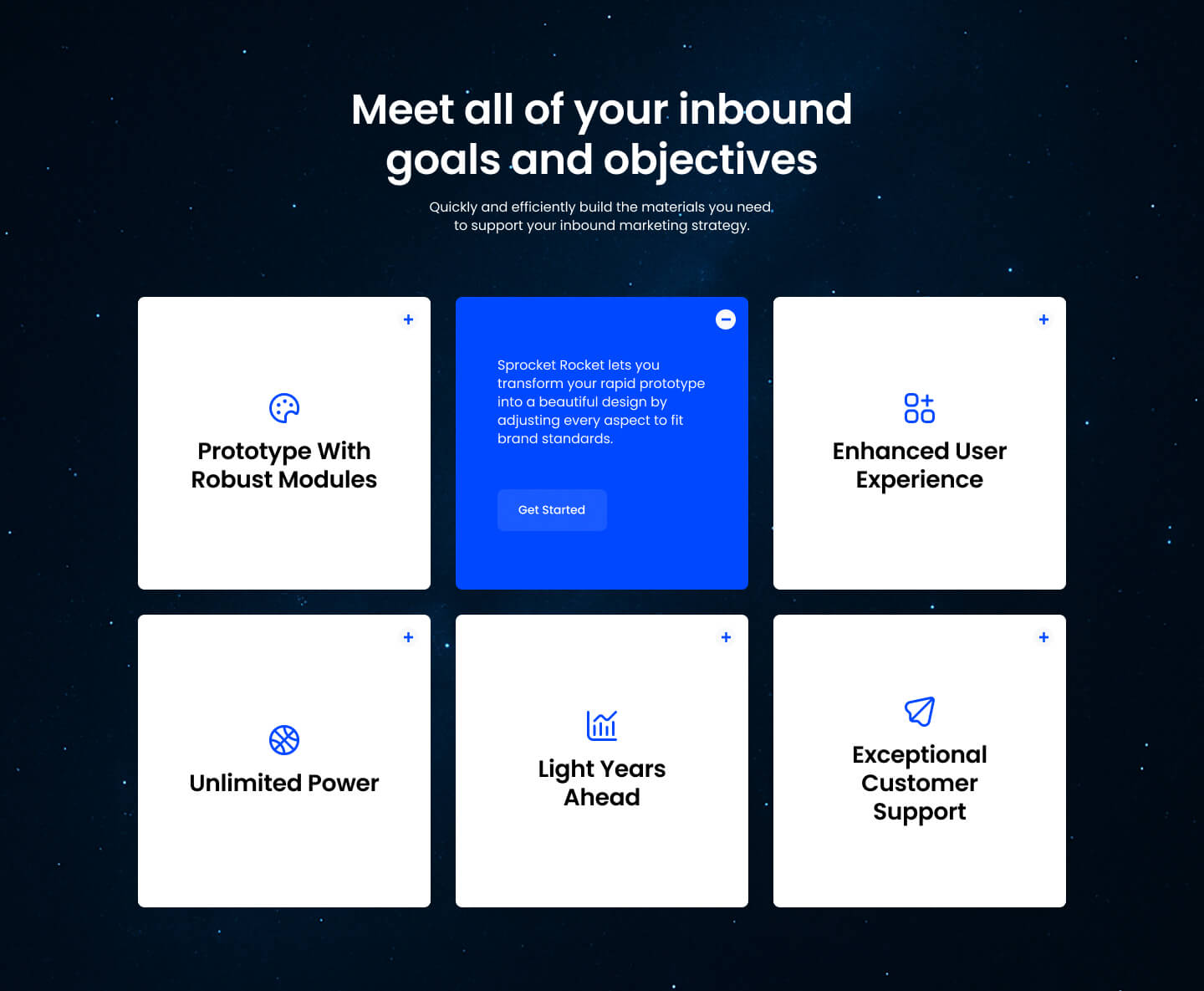
Clicking or hovering a card flips it to reveal a second set of copy, a heading, and a CTA button on the back, which sets it apart from every other card grid that displays all its content at once. Give each card an image plus separate flip-side heading, description, and button text since the module hides that extra content until the flip triggers.
Use cases
- Flip-to-reveal feature cards
- Interactive service highlights
- Hover cards with hidden cta
- Capability grid with extra detail on flip
- Six-card interactive teaser grid
Where it fits
- Included with: Core
- Page sections: Features, Benefits, Content
Editable fields
Content tab
| Field | Type | Notes |
|---|---|---|
| Background Video | File | Repeats: min 0, default 1. Add multiple file formats in order to provide compatibility with a broad range of browsers. |
| Background Video Tablet | File | Repeats: min 0, default 1. This background video will only be used on tablet devices. |
| Background Video Mobile | File | Repeats: min 0, default 1. This background video will only be used on mobile devices. |
| Enabled | Boolean | |
| ID | Text | Assign a ID to the module. |
| Class | Text | Assign a CLASS to the module. |
| Description | Rich text | |
| Lead Text | Boolean | Turn on to make the Description text larger. |
| Column Vertical Align | Choice | Options: Auto, Top, Center, Bottom, Stretch. |
Heading Repeats: min 0, default 1.
| Field | Type | Notes |
|---|---|---|
| Heading | Text | |
| Size | Choice | HTML heading size. Options: H1, H2, H3, H4, H5, H6, P. |
| Display Size | Choice | Size that heading is displayed at. 12 options, including Auto, H1, H2. |
| Color | Choice | 15 options, including Auto, Primary, Secondary. |
| Color | Color | |
| Align | Choice | Options: Auto, Left, Center, Right. |
| CSS Class | Text |
Cards › Default Repeats: min 1, max 1, default 1. Default content for the card.
| Field | Type | Notes |
|---|---|---|
| Image | Image | |
| Description | Rich text | |
| Lead Text | Boolean | Turn on to make the Description text larger. |
Cards › Default › Heading Repeats: min 0, default 1.
| Field | Type | Notes |
|---|---|---|
| Card Heading | Text | |
| Card Heading Size | Choice | HTML heading size. Options: H1, H2, H3, H4, H5, H6, P. |
| Card Heading Display Size | Choice | Size that heading is displayed at. 12 options, including Auto, H1, H2. |
| Card Heading Color | Choice | 15 options, including Auto, Primary, Secondary. |
| Card Heading Color | Color | |
| Card Heading Align | Choice | Options: Auto, Left, Center, Right. |
| CSS Class | Text |
Cards › Active Repeats: min 1, max 1, default 1. Content for the card on click.
| Field | Type | Notes |
|---|---|---|
| Description | Rich text | |
| Lead Text | Boolean | Turn on to make the Description text larger. |
Cards › Active › Heading Repeats: min 0, default 0.
| Field | Type | Notes |
|---|---|---|
| Card Heading | Text | |
| Card Heading Size | Choice | HTML heading size. Options: H1, H2, H3, H4, H5, H6, P. |
| Card Heading Display Size | Choice | Size that heading is displayed at. 12 options, including Auto, H1, H2. |
| Card Heading Color | Choice | 15 options, including Auto, Primary, Secondary. |
| Card Heading Color | Color | |
| Card Heading Align | Choice | Options: Auto, Left, Center, Right. |
| CSS Class | Text |
Cards › Active › CTA Repeats: min 0, default 1.
| Field | Type | Notes |
|---|---|---|
| CTA Type | Choice | Options: HubSpot CTA, HubSpot Payment, Button, Modal. |
| CTA Style | Choice | 26 options, including Primary, Secondary, Tertiary. |
| CTA | CTA | |
| Button Text | Text | |
| Modal Target | Text | |
| Link | Link | |
| Payment link | Payment | |
| Checkout behavior | Choice | Options: Open in a new tab, Sliding overlay. |
| CTA Size | Choice | Options: Small, Default, Large. |
| Add icon | Boolean |
Cards › Active › CTA › Default
| Field | Type | Notes |
|---|---|---|
| Background | Color | |
| Text | Color | |
| Border | Color |
Cards › Active › CTA › Hover
| Field | Type | Notes |
|---|---|---|
| Background | Color | |
| Text | Color | |
| Border Color | Color |
Cards › Active › CTA › Icon
| Field | Type | Notes |
|---|---|---|
| Icon | Icon | |
| Position | Choice | Options: Left, Right. |
| Purpose | Choice | The purpose of the icon, used for accessibility. If set to decorative, an additional attribute of aria-hidden="true" will be added to the icon. Options: Decorative, Semantic. |
Column Size Repeats: min 1, max 4, default 3. Columns follow a twelve column grid.
| Field | Type | Notes |
|---|---|---|
| Column Breakpoint | Choice | Options: None, Mobile, Tablet, Desktop, XL. |
| Column Width | Choice | 12 options, including 1, 2, 3. |
| Column Offset | Choice | 13 options, including 0, 1, 2. |
| Column Order | Number |
Style tab
Change log
| Version | Change |
|---|---|
| 3.0.0 | Stardust update |
| 2.3.1 | Cards are expandable by keyboard |
| 2.3.0 | Accessibility improvements |
| 2.2.1 | Added none column breakpoint for smaller screens |
| 2.2.0 | Added responsive background options |
| 2.1.3 | Fixed margins on the cards |
| 2.1.2 | Added column size options |
| 2.1.1 | Added new Link options |
| 2.1.0 | Add default/active options |
| 2.0.2 | Added ability to customize card styles |
| 2.0.1 | Added Column option |
SR Cards Filter 02
This module renders a heading, optional rich text description, a single tag filter bar, and a grid of up to 7 image and rich text cards, with an optional load more button that reveals additional cards beyond the initial count.
SR Cards Grid 01
Renders an optional section heading and description above a grid of up to five text-only cards, each with its own heading, body copy, and a single button.