

SR Cards Articles 01
Renders a heading and optional description above a carousel of blog post cards, each showing a featured image, title, author avatar and name, summary or meta text, and a Read More button.
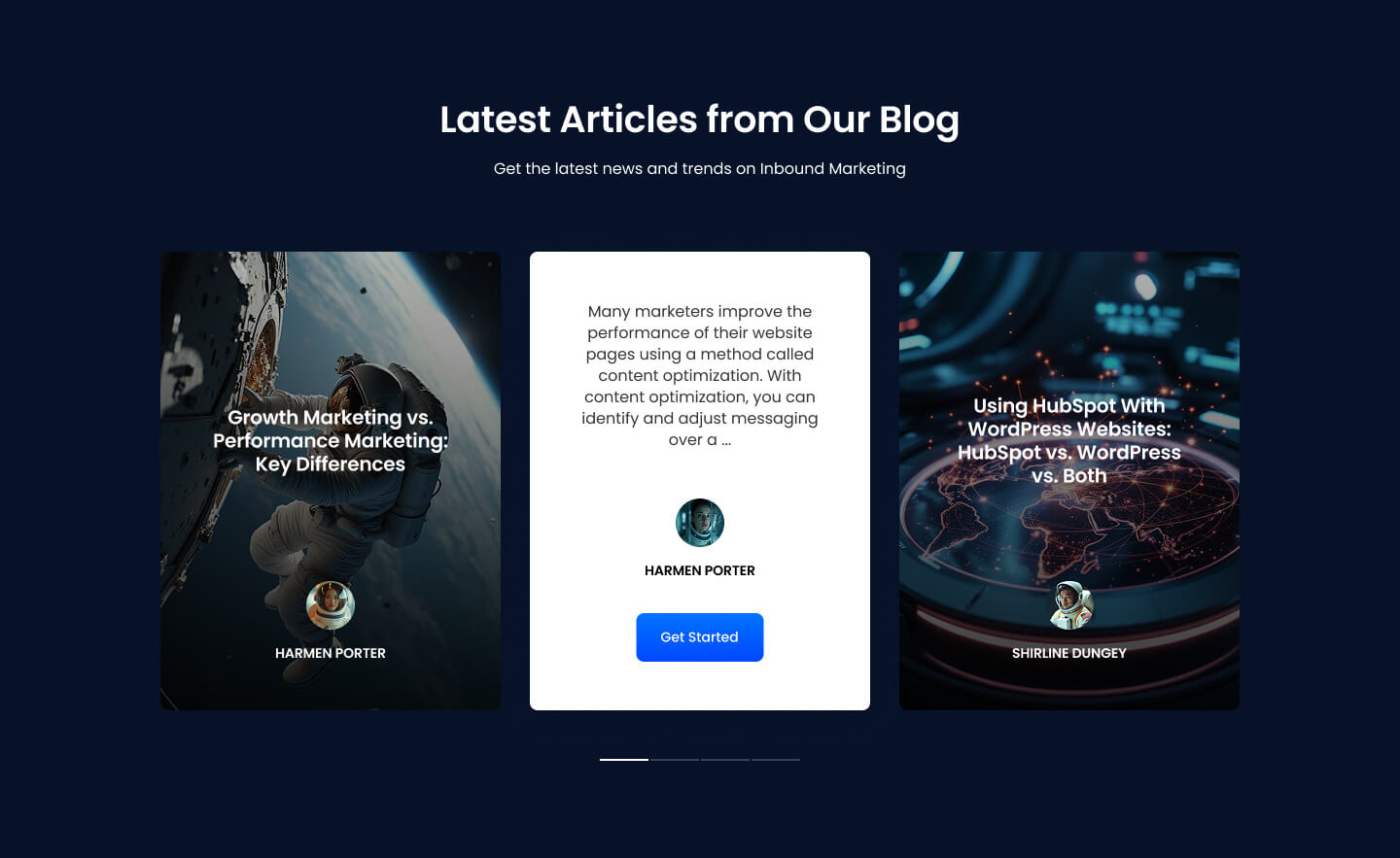
Choose this over SR Cards Articles 01, 02, and 03 when the section needs slider controls such as dots, arrows, and autoplay to cycle through posts instead of a static grid or grid-plus-form layout. It pulls posts automatically from a connected blog and tag or from a manual selection, and shows placeholder articles with images if no posts are found.
Use cases
- Blog post carousel
- Autoplay article slider
- Recent posts slideshow
- Tag-filtered post carousel
- Rotating article highlights
Where it fits
- Included with: Core
- Page sections: Blog, Content
Editable fields
Content tab
| Field | Type | Notes |
|---|---|---|
| Background Video | File | Repeats: min 0, default 1. Add multiple file formats in order to provide compatibility with a broad range of browsers. |
| Background Video Tablet | File | Repeats: min 0, default 1. This background video will only be used on tablet devices. |
| Background Video Mobile | File | Repeats: min 0, default 1. This background video will only be used on mobile devices. |
| Enabled | Boolean | |
| ID | Text | Assign a ID to the module. |
| Class | Text | Assign a CLASS to the module. |
| Description | Rich text | |
| Lead Text | Boolean | Turn on to make the Description text larger. |
| Manually Select posts | Boolean | |
| Blog | Blog | |
| Tag | Tag | |
| Blog Post | Page | Repeats: min 0, default 0. Select the blog post you want to display. |
| Number of Posts | Number | |
| Blog Summary | Choice | Use the meta description option if there are issues pulling in the summary, as the summary can contain HTML and/or modules. Options: Show post's meta description, Show post's summary, Disabled. |
| Show Author | Boolean | |
| Show Tags | Boolean | |
| Dots | Boolean | |
| Arrows | Boolean | |
| Autoplay | Boolean | |
| Autoplay Speed | Number |
Heading Repeats: min 0, default 1.
| Field | Type | Notes |
|---|---|---|
| Heading | Text | |
| Size | Choice | HTML heading size. Options: H1, H2, H3, H4, H5, H6, P. |
| Display Size | Choice | Size that heading is displayed at. 12 options, including Auto, H1, H2. |
| Color | Choice | 15 options, including Auto, Primary, Secondary. |
| Color | Color | |
| Align | Choice | Options: Auto, Left, Center, Right. |
| CSS Class | Text |
Button Repeats: min 1, max 1, default 1.
| Field | Type | Notes |
|---|---|---|
| CTA Type | Choice | Options: HubSpot CTA, Button. |
| CTA Style | Choice | 26 options, including Primary, Secondary, Tertiary. |
| Button Text | Text | |
| Link | Link | |
| CTA Size | Choice | Options: Small, Default, Large. |
| Add icon | Boolean |
Button › Default
| Field | Type | Notes |
|---|---|---|
| Background | Color | |
| Text | Color | |
| Border | Color |
Button › Hover
| Field | Type | Notes |
|---|---|---|
| Background | Color | |
| Text | Color | |
| Border Color | Color |
Button › Icon
| Field | Type | Notes |
|---|---|---|
| Icon | Icon | |
| Position | Choice | Options: Left, Right. |
| Purpose | Choice | The purpose of the icon, used for accessibility. If set to decorative, an additional attribute of aria-hidden="true" will be added to the icon. Options: Decorative, Semantic. |
Style tab
Change log
| Version | Change |
|---|---|
| 4.0.3 | Fixed author link issue |
| 4.0.2 | Fixed read more CTA link |
| 4.0.1 | Added card background color option |
| 4.0.0 | Stardust update |
| 3.2.2 | Fixed manual post selection |
| 3.2.1 | Added manually select posts option |
| 3.2.0 | Accessibility improvements |
| 3.1.0 | Added responsive background options |
| 3.0.8 | Added option to use post meta description |
| 3.0.7 | Show author toggle affects author details behind the card as well |
| 3.0.6 | Made corrections to the post summary tag |
| 3.0.5 | Fixed issue with post_body |
| 3.0.4 | Added video background option |
| 3.0.3 | Added new Link options |
| 3.0.2 | Fixed dots not loading |
| 3.0.1 | Fixed Fields typo |
| 3.0.0 | Major fixes and improvements |
| 2.0.3 | Minor Fixes |
| 2.0.2 | Added a tag option |
| 2.0.1 | Fixed Modal CTA link |
SR Tabs Split Screen 01
This module renders a split screen layout with a fixed image column on one side and up to three clickable menu tabs on the other, each tab swapping in its own heading, description text, and CTA button, plus its own background image or color and an image overlay heading.
SR Cards Articles 02
This module renders a heading with optional description and CTA buttons above a static grid of blog post cards pulled from a HubSpot blog or tag, or picked manually, each card showing a featured image, meta or summary text, author, tag, and a Read More link.