

SR Offer Smart Pop 02
This module renders a corner tab that stays fixed on screen with a teaser line and icon, then expands into a slim panel holding a heading, description text, and a HubSpot form.
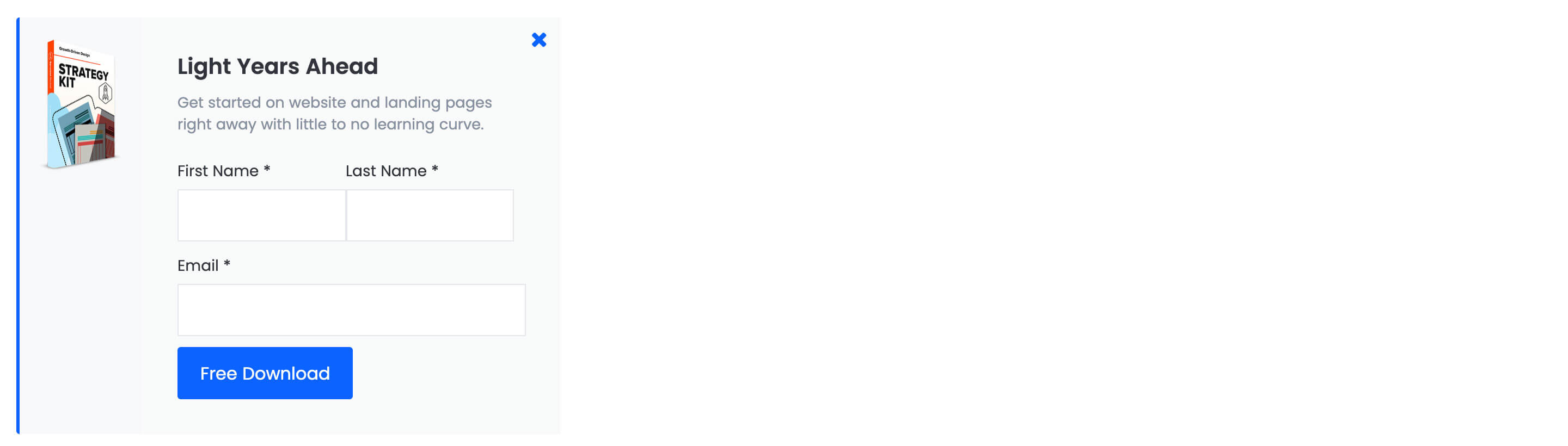
It differs from sr-offer-smart-pop-01 by using a compact icon toggle instead of a full teaser bar, and by opening a narrow form panel rather than a wider image-plus-form layout. It needs a connected form to work and does not use an image next to the form fields, only a small open and closed icon.
Use cases
- Corner popup offer
- Sticky lead capture tab
- Free trial download nudge
- Exit intent style form teaser
- Newsletter signup corner widget
- Gated content prompt
Where it fits
- Included with: PRO
- Page sections: Cta, Form, Not a page section
Editable fields
Content tab
| Field | Type | Notes |
|---|---|---|
| Enabled | Boolean | |
| ID | Text | Assign a ID to the module. |
| Class | Text | Assign a CLASS to the module. |
| Teaser | Text | |
| Image | Image | Recommended Size: 80x80px. |
| Opened Image | Image | Recommended Size: 160x240px. |
| Popup Delay | Number | To have the popup appear immediately, set the timer to 0. If you wish to turn off the automatic popup feature, set the timer to -1. To open the popup through a button, link the button's Modal Target with the unique ID of this popup moduleq. |
Form
| Field | Type | Notes |
|---|---|---|
| Enabled | Boolean | |
| Lazy Load | Boolean | To use this feature, you must have either Marketing Hub or Content Hub Professional or Enterprise, and you need to enable the "Set as raw HTML" option in the form settings. |
| Form Height | Number | Used to set a minimum height for the form, this prevents layout shifts when the form loads. |
| Description | Rich text | |
| Lead Text | Boolean | Turn on to make the Description text larger. |
| Form | Form | |
| Send form notifications to specified email addresses instead of the form defaults | Boolean | |
| Email Addresses | ||
| Salesforce campaign | Salesforcecampaign |
Form › Styles
| Field | Type | Notes |
|---|---|---|
| Background Color | Color | |
| Text Color | Choice | Set to Auto to use the default text color. Set to Custom to set a custom text color. 15 options, including Auto, Primary, Secondary. |
| Text Color | Color | |
| Hide Field Labels | Boolean |
Form › Styles › Button
| Field | Type | Notes |
|---|---|---|
| Style | Choice | 26 options, including Primary, Secondary, Tertiary. |
| Size | Choice | Options: Small, Default, Large. |
| Align | Choice | Options: Auto, Left, Center, Right. |
| Full Width | Boolean |
Form › Styles › Button › Default
| Field | Type | Notes |
|---|---|---|
| Background | Color | |
| Text | Color | |
| Border | Color |
Form › Styles › Button › Hover
| Field | Type | Notes |
|---|---|---|
| Background | Color | |
| Text | Color | |
| Border Color | Color |
Form › Styles › Padding
| Field | Type | Notes |
|---|---|---|
| Top | Number | |
| Bottom | Number | |
| Left | Number | |
| Right | Number |
Form › Styles › Border
| Field | Type | Notes |
|---|---|---|
| Style | Choice | Options: Gradient One, Gradient Two, None, Solid, Dotted, Dashed, Double. |
| Color | Color | |
| Width | Number | |
| Radius | Number | |
| Top | Boolean | |
| Bottom | Boolean | |
| Left | Boolean | |
| Right | Boolean |
Form › Heading Repeats: min 0, default 1.
| Field | Type | Notes |
|---|---|---|
| Heading | Text | |
| Heading Size | Choice | HTML heading size. Options: H1, H2, H3, H4, H5, H6, P. |
| Heading Display Size | Choice | Size that heading is displayed at. 12 options, including Auto, H1, H2. |
| Heading Color | Choice | 15 options, including Auto, Primary, Secondary. |
| Heading Color | Color | |
| Heading Align | Choice | Options: Auto, Left, Center, Right. |
| CSS Class | Text |
Style tab
Change log
| Version | Change |
|---|---|
| 2.3.2 | Added ability to set custom button styles |
| 2.3.1 | Added ability to use new HS form |
| 2.3.0 | Accessibility improvements |
| 2.2.0 | Introduced a lazy loading feature for forms |
| 2.1.0 | Remove jQuery |
| 2.0.1 | Fixed hierarchy issues |
SR Offer Smart Pop 01
This module renders a slim teaser bar with a headline and close icon fixed to the page, which expands into a wider panel holding an optional image beside a HubSpot form with its own heading, description text, and submit button.
SR Offer Two Col 01
This module renders a two column offer with a heading, rich text description, optional CTA buttons, and a side image in one column, plus an embedded HubSpot form stacked below the copy in the other column.