

SR Two Col Features 02
Renders a heading and rich text description above a two column section, with one shared media block (image, video, form, or lottie) on one side and a stacked list of up to six feature items on the other, each item having an icon or image, a heading, and rich text.
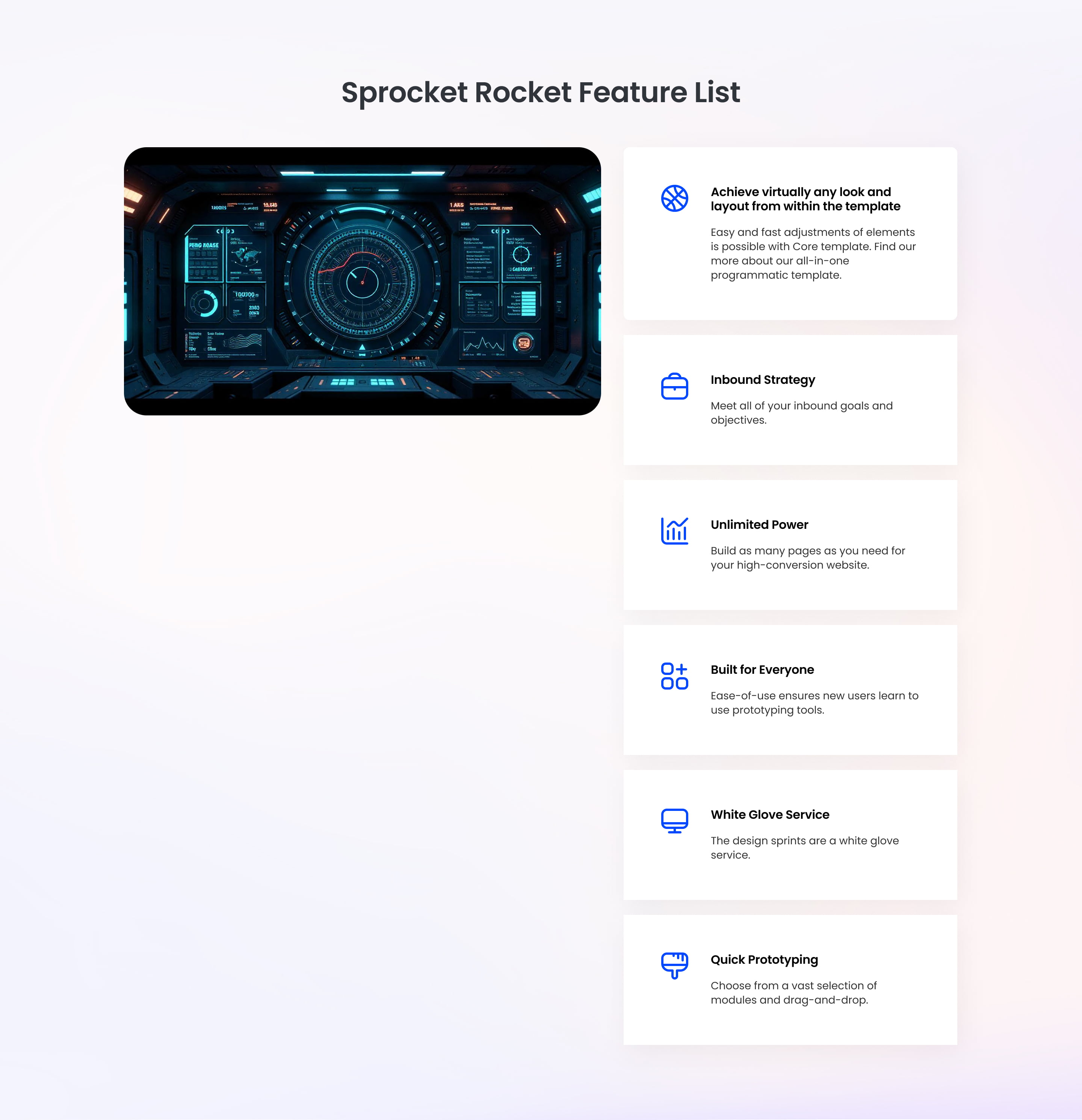
Pick this over Two Col Features 01 when the section needs one anchoring visual or embedded form paired with short supporting text points, rather than a grid of individually linked cards with hover images. Feature items here are plain text blocks, not separate linked pages, and column widths and order can still be tuned per breakpoint.
Use cases
- Product screenshot with feature list
- Demo video next to benefit points
- Signup form beside product highlights
- Lottie animation with supporting feature text
- Software feature overview with icons
- App walkthrough image and short feature bullets
Where it fits
- Included with: PRO
- Page sections: Features, Benefits, Content
Editable fields
Content tab
| Field | Type | Notes |
|---|---|---|
| Background Video | File | Repeats: min 0, default 1. Add multiple file formats in order to provide compatibility with a broad range of browsers. |
| Background Video Tablet | File | Repeats: min 0, default 1. This background video will only be used on tablet devices. |
| Background Video Mobile | File | Repeats: min 0, default 1. This background video will only be used on mobile devices. |
| Enabled | Boolean | |
| ID | Text | Assign a ID to the module. |
| Class | Text | Assign a CLASS to the module. |
| Description | Rich text | |
| Lead Text | Boolean | Turn on to make the Description text larger. |
| Media Type | Choice | Options: Image, Video, Form, Lottie, None. |
| Image | Image | |
| Image Corner Radius | Number | |
| Image Link | Link | |
| Lottie Embed Code | Text | How to add LottieFiles. |
| Content | Rich text | |
| Lead Text | Boolean | Turn on to make the content text larger. |
Heading Repeats: min 0, default 1.
| Field | Type | Notes |
|---|---|---|
| Heading | Text | |
| Size | Choice | HTML heading size. Options: H1, H2, H3, H4, H5, H6, P. |
| Display Size | Choice | Size that heading is displayed at. 12 options, including Auto, H1, H2. |
| Color | Choice | 15 options, including Auto, Primary, Secondary. |
| Color | Color | |
| Align | Choice | Options: Auto, Left, Center, Right. |
| CSS Class | Text |
Video
| Field | Type | Notes |
|---|---|---|
| Video type | Choice | Options: Embed, HTML Video, HubSpot Video. |
| HubSpot Video | Video player | |
| Embed | Embed | |
| Custom Thumbnail | Image | |
| Video File | File | Repeats: default 1. Add multiple file formats in order to provide compatibility with a broad range of browsers. |
| Video Poster | Image | |
| Show Controls | Boolean | |
| Autoplay | Boolean | |
| Loop | Boolean | |
| Muted | Boolean | |
| Video Accent | Choice | Add a design accent behind your video. Options: None, Design 1, Design 2, Design 3. |
| Video Accent Color | Choice | 11 options, including Primary, Secondary, Tertiary. |
| Custom Accent Color | Color |
Video › Style Options
| Field | Type | Notes |
|---|---|---|
| Play button color | Color |
Video › Placeholder text
| Field | Type | Notes |
|---|---|---|
| Video placeholder title | Text | |
| Video placeholder description | Text |
Form
| Field | Type | Notes |
|---|---|---|
| Enabled | Boolean | |
| Lazy Load | Boolean | To use this feature, you must have either Marketing Hub or Content Hub Professional or Enterprise, and you need to enable the "Set as raw HTML" option in the form settings. |
| Form Height | Number | Used to set a minimum height for the form, this prevents layout shifts when the form loads. |
| Description | Rich text | |
| Lead Text | Boolean | Turn on to make the Description text larger. |
| Form | Form | |
| Send form notifications to specified email addresses instead of the form defaults | Boolean | |
| Email Addresses | ||
| Salesforce campaign | Salesforcecampaign |
Form › Styles
| Field | Type | Notes |
|---|---|---|
| Background Color | Color | |
| Text Color | Choice | Set to Auto to use the default text color. Set to Custom to set a custom text color. 15 options, including Auto, Primary, Secondary. |
| Text Color | Color | |
| Hide Field Labels | Boolean |
Form › Styles › Button
| Field | Type | Notes |
|---|---|---|
| Style | Choice | 26 options, including Primary, Secondary, Tertiary. |
| Size | Choice | Options: Small, Default, Large. |
| Align | Choice | Options: Auto, Left, Center, Right. |
| Full Width | Boolean |
Form › Styles › Button › Default
| Field | Type | Notes |
|---|---|---|
| Background | Color | |
| Text | Color | |
| Border | Color |
Form › Styles › Button › Hover
| Field | Type | Notes |
|---|---|---|
| Background | Color | |
| Text | Color | |
| Border Color | Color |
Form › Styles › Padding
| Field | Type | Notes |
|---|---|---|
| Top | Number | |
| Bottom | Number | |
| Left | Number | |
| Right | Number |
Form › Styles › Border
| Field | Type | Notes |
|---|---|---|
| Style | Choice | Options: Gradient One, Gradient Two, None, Solid, Dotted, Dashed, Double. |
| Color | Color | |
| Width | Number | |
| Radius | Number | |
| Top | Boolean | |
| Bottom | Boolean | |
| Left | Boolean | |
| Right | Boolean |
Form › Heading Repeats: min 0, default 1.
| Field | Type | Notes |
|---|---|---|
| Heading | Text | |
| Heading Size | Choice | HTML heading size. Options: H1, H2, H3, H4, H5, H6, P. |
| Heading Display Size | Choice | Size that heading is displayed at. 12 options, including Auto, H1, H2. |
| Heading Color | Choice | 15 options, including Auto, Primary, Secondary. |
| Heading Color | Color | |
| Heading Align | Choice | Options: Auto, Left, Center, Right. |
| CSS Class | Text |
Heading Repeats: min 0, default 0.
| Field | Type | Notes |
|---|---|---|
| Heading | Text | |
| Size | Choice | HTML heading size. Options: H1, H2, H3, H4, H5, H6, P. |
| Display Size | Choice | Size that heading is displayed at. 12 options, including Auto, H1, H2. |
| Color | Choice | 15 options, including Auto, Primary, Secondary. |
| Color | Color | |
| Align | Choice | Options: Auto, Left, Center, Right. |
| CSS Class | Text |
CTA Repeats: min 0, default 0.
| Field | Type | Notes |
|---|---|---|
| CTA Type | Choice | Options: HubSpot CTA, HubSpot Payment, Button, Modal. |
| CTA Style | Choice | 26 options, including Primary, Secondary, Tertiary. |
| CTA | CTA | |
| Button Text | Text | |
| Modal Target | Text | |
| Link | Link | |
| Payment link | Payment | |
| Checkout behavior | Choice | Options: Open in a new tab, Sliding overlay. |
| CTA Size | Choice | Options: Small, Default, Large. |
| Add icon | Boolean |
CTA › Default
| Field | Type | Notes |
|---|---|---|
| Background | Color | |
| Text | Color | |
| Border | Color |
CTA › Hover
| Field | Type | Notes |
|---|---|---|
| Background | Color | |
| Text | Color | |
| Border Color | Color |
CTA › Icon
| Field | Type | Notes |
|---|---|---|
| Icon | Icon | |
| Position | Choice | Options: Left, Right. |
| Purpose | Choice | The purpose of the icon, used for accessibility. If set to decorative, an additional attribute of aria-hidden="true" will be added to the icon. Options: Decorative, Semantic. |
Features Repeats: min 1, default 6.
| Field | Type | Notes |
|---|---|---|
| Feature Image | Image | Recommended size: 120x120px. |
| Feature Content | Rich text | |
| Enable Link | Boolean | |
| Feature URL | Link |
Features › Feature Heading Repeats: min 0, default 1.
| Field | Type | Notes |
|---|---|---|
| Heading | Text | |
| Size | Choice | HTML heading size. Options: H1, H2, H3, H4, H5, H6, P. |
| Display Size | Choice | Size that heading is displayed at. 12 options, including Auto, H1, H2. |
| Color | Choice | 15 options, including Auto, Primary, Secondary. |
| Color | Color | |
| Align | Choice | Options: Auto, Left, Center, Right. |
| CSS Class | Text |
Columns › Content Repeats: min 1, max 4, default 1. Columns follow a twelve column grid.
| Field | Type | Notes |
|---|---|---|
| Column Breakpoint | Choice | Options: None, Mobile, Tablet, Desktop, XL. |
| Column Width | Choice | 12 options, including 1, 2, 3. |
| Column Offset | Choice | 13 options, including 0, 1, 2. |
| Column Order | Number |
Columns › Features Repeats: min 1, max 4, default 1. Columns follow a twelve column grid.
| Field | Type | Notes |
|---|---|---|
| Column Breakpoint | Choice | Options: Mobile, Tablet, Desktop, XL. |
| Column Width | Choice | 12 options, including 1, 2, 3. |
| Column Offset | Choice | 13 options, including 0, 1, 2. |
| Column Order | Number |
Style tab
Change log
| Version | Change |
|---|---|
| 4.0.0 | Stardust update |
| 3.3.3 | Added ability to set custom button styles |
| 3.3.2 | Added ability to use new HS form |
| 3.3.1 | Column breakpoint fix |
| 3.3.0 | Accessibility improvements |
| 3.2.1 | Updated lottie js |
| 3.2.0 | Added responsive background options |
| 3.1.0 | Introduced a lazy loading feature for forms |
| 3.0.3 | Added new Link options |
SR Two Col Features 01
Renders an optional heading and description above a grid of feature cards, each with an image, a swap-on-hover image, a heading, rich text, and an optional link.
SR Two Col Gallery 01
This module renders a two column layout with a heading, rich text description, optional lead text, and a CTA on one side, paired with a configurable gallery of one to four images with per-image position, color overlay, and gap controls on the other side.