

SR Pricing 01
This module renders a full comparison-style pricing table with a heading and description, a table title, up to four plan columns with price, prefix, suffix and a CTA button each, and up to two feature rows with tooltips shown across all columns.
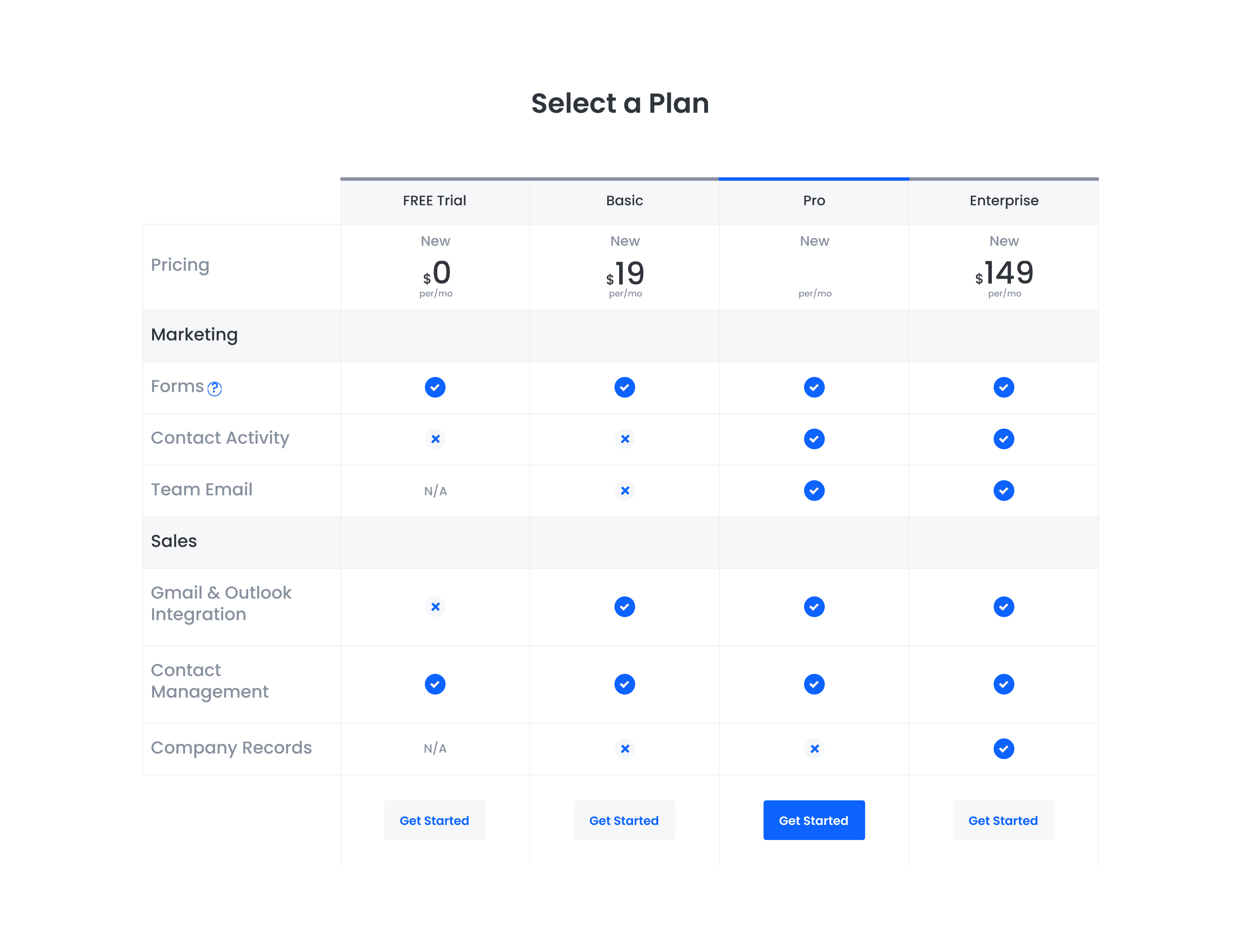
Pick it over SR Pricing 02 and 03 when you need a detailed row-by-row feature comparison grid across several plans rather than a simple set of pricing cards. It expects short feature labels and tooltip text since the row layout is built for scanning line by line, not long descriptions.
Use cases
- Four-tier feature comparison table
- Saas plan feature breakdown
- Pricing grid with tooltips
- Side-by-side plan comparison with checkmarks
- Detailed pricing matrix with row labels
Where it fits
- Included with: PRO
- Page sections: Pricing, Comparison
Editable fields
Content tab
| Field | Type | Notes |
|---|---|---|
| Background Video | File | Repeats: min 0, default 1. Add multiple file formats in order to provide compatibility with a broad range of browsers. |
| Background Video Tablet | File | Repeats: min 0, default 1. This background video will only be used on tablet devices. |
| Background Video Mobile | File | Repeats: min 0, default 1. This background video will only be used on mobile devices. |
| Enabled | Boolean | |
| ID | Text | Assign a ID to the module. |
| Class | Text | Assign a CLASS to the module. |
| Description | Rich text |
Heading Repeats: min 0, default 1.
| Field | Type | Notes |
|---|---|---|
| Heading | Text | |
| Size | Choice | HTML heading size. Options: H1, H2, H3, H4, H5, H6, P. |
| Display Size | Choice | Size that heading is displayed at. 12 options, including Auto, H1, H2. |
| Color | Choice | 15 options, including Auto, Primary, Secondary. |
| Color | Color | |
| Align | Choice | Options: Auto, Left, Center, Right. |
| CSS Class | Text |
Heading Repeats: min 1, max 1, default 1.
| Field | Type | Notes |
|---|---|---|
| Heading | Text | |
| Size | Choice | HTML heading size. Options: H1, H2, H3, H4, H5, H6, P. |
| Display Size | Choice | Size that heading is displayed at. 12 options, including Auto, H1, H2. |
| Color | Choice | 15 options, including Auto, Primary, Secondary. |
| Color | Color | |
| Align | Choice | Options: Auto, Left, Center, Right. |
| CSS Class | Text |
Columns Repeats: min 2, max 4, default 4.
| Field | Type | Notes |
|---|---|---|
| Plan Highlight | Boolean | |
| Symbol | Text | |
| Price | Text |
Columns › Heading Repeats: min 1, max 1, default 1.
| Field | Type | Notes |
|---|---|---|
| Heading | Text | |
| Size | Choice | HTML heading size. Options: H1, H2, H3, H4, H5, H6, P. |
| Display Size | Choice | Size that heading is displayed at. 12 options, including Auto, H1, H2. |
| Color | Choice | 15 options, including Auto, Primary, Secondary. |
| Color | Color | |
| Align | Choice | Options: Auto, Left, Center, Right. |
| CSS Class | Text |
Columns › Prefix
| Field | Type | Notes |
|---|---|---|
| Text | Text | |
| Size | Choice | Options: Small, Default, Large. |
Columns › Suffix
| Field | Type | Notes |
|---|---|---|
| Text | Text | |
| Size | Choice | Options: Small, Default, Large. |
Columns › CTA Repeats: min 0, default 1.
| Field | Type | Notes |
|---|---|---|
| CTA Type | Choice | Options: HubSpot CTA, HubSpot Payment, Button, Modal. |
| CTA Style | Choice | 26 options, including Primary, Secondary, Tertiary. |
| CTA | CTA | |
| Button Text | Text | |
| Modal Target | Text | |
| Link | Link | |
| Payment link | Payment | |
| Checkout behavior | Choice | Options: Open in a new tab, Sliding overlay. |
| CTA Size | Choice | Options: Small, Default, Large. |
| Add icon | Boolean |
Columns › CTA › Default
| Field | Type | Notes |
|---|---|---|
| Background | Color | |
| Text | Color | |
| Border | Color |
Columns › CTA › Hover
| Field | Type | Notes |
|---|---|---|
| Background | Color | |
| Text | Color | |
| Border Color | Color |
Columns › CTA › Icon
| Field | Type | Notes |
|---|---|---|
| Icon | Icon | |
| Position | Choice | Options: Left, Right. |
| Purpose | Choice | The purpose of the icon, used for accessibility. If set to decorative, an additional attribute of aria-hidden="true" will be added to the icon. Options: Decorative, Semantic. |
Rows › Heading Repeats: min 1, max 1, default 1.
| Field | Type | Notes |
|---|---|---|
| Heading | Text | |
| Size | Choice | HTML heading size. Options: H1, H2, H3, H4, H5, H6, P. |
| Display Size | Choice | Size that heading is displayed at. 12 options, including Auto, H1, H2. |
| Color | Choice | 15 options, including Auto, Primary, Secondary. |
| Color | Color | |
| Align | Choice | Options: Auto, Left, Center, Right. |
| CSS Class | Text |
Rows › Features Repeats: min 1, default 1.
| Field | Type | Notes |
|---|---|---|
| Tooltip | Text |
Rows › Features › Heading Repeats: min 1, max 1, default 1.
| Field | Type | Notes |
|---|---|---|
| Heading | Text | |
| Size | Choice | HTML heading size. Options: H1, H2, H3, H4, H5, H6, P. |
| Display Size | Choice | Size that heading is displayed at. 12 options, including Auto, H1, H2. |
| Color | Choice | 15 options, including Auto, Primary, Secondary. |
| Color | Color | |
| Align | Choice | Options: Auto, Left, Center, Right. |
| CSS Class | Text |
Rows › Features › Columns Repeats: min 0, max 4, default 4.
| Field | Type | Notes |
|---|---|---|
| Icon | Icon | |
| Color | Color | |
| Tooltip | Text | |
| Rich Text | Rich text | |
| Purpose | Choice | The purpose of the icon, used for accessibility. If set to decorative, an additional attribute of aria-hidden="true" will be added to the icon. Options: Decorative, Semantic. |
Style tab
Change log
| Version | Change |
|---|---|
| 3.2.1 | Added SVG color fill |
| 3.2.0 | Accessibility improvements |
| 3.1.1 | Fixed borders issue on mobile |
| 3.1.0 | Added responsive background options |
| 3.0.1 | Added new Link options |
| 3.0.0 | Rebuilt with new features |
| 2.0.2 | Added currency text field |
| 2.0.1 | Removed $ when first table price is empty |
SR FAQ 01
This module renders a heading and description on the left with a set of FAQ cards on the right, each card showing a question and rich text answer.
SR Pricing 02
This module renders a two-column layout with an intro heading and description on the left, a secondary heading and description above the cards, and exactly two pricing cards on the right, each with a plan name, price, CTA button, and four feature list items.