

SR Tabs Horizontal 02
Renders a vertical stack of three colored tab buttons in a left column next to a right-hand content panel that swaps a heading and rich text block on click.
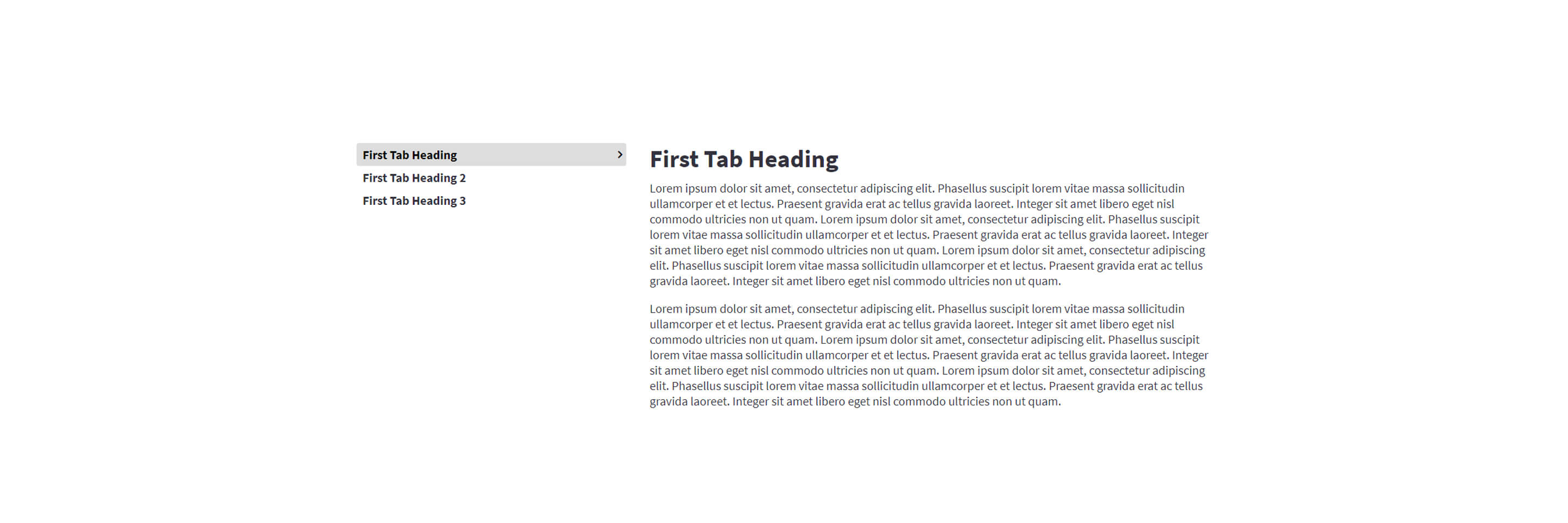
Each tab button has its own background and active-background color plus its own heading, making the nav look like a set of card triggers rather than plain text links. Choose this over SR Tabs Horizontal 01 when you want colored card-style tabs with configurable column widths and no side image, since this module has no image fields at all.
Use cases
- Colored feature tab switcher
- Service overview with card-style tabs
- Product benefits broken into clickable panels
- Step-by-step process with colored nav cards
- Plan or package comparison in tab form
Where it fits
- Included with: PRO
- Page sections: Features, Content, Benefits
Editable fields
Content tab
| Field | Type | Notes |
|---|---|---|
| Background Video | File | Repeats: min 0, default 1. Add multiple file formats in order to provide compatibility with a broad range of browsers. |
| Background Video Tablet | File | Repeats: min 0, default 1. This background video will only be used on tablet devices. |
| Background Video Mobile | File | Repeats: min 0, default 1. This background video will only be used on mobile devices. |
| Enabled | Boolean | |
| ID | Text | Assign a ID to the module. |
| Class | Text | Assign a CLASS to the module. |
Tabs Repeats: min 2, default 3.
| Field | Type | Notes |
|---|---|---|
| Tab Content | Rich text |
Tabs › Tab Label Repeats: min 1, max 1, default 1.
| Field | Type | Notes |
|---|---|---|
| Background Color | Color | |
| Active Background Color | Color | |
| Heading | Text | |
| Size | Choice | HTML heading size. Options: H1, H2, H3, H4, H5, H6, P. |
| Display Size | Choice | Size that heading is displayed at. 12 options, including Auto, H1, H2. |
| Color | Choice | 15 options, including Auto, Primary, Secondary. |
| Color | Color | |
| Align | Choice | Options: Auto, Left, Center, Right. |
| CSS Class | Text |
Tabs › Heading Repeats: min 0, default 1.
| Field | Type | Notes |
|---|---|---|
| Heading | Text | |
| Size | Choice | HTML heading size. Options: H1, H2, H3, H4, H5, H6, P. |
| Display Size | Choice | Size that heading is displayed at. 12 options, including Auto, H1, H2. |
| Color | Choice | 15 options, including Auto, Primary, Secondary. |
| Color | Color | |
| Align | Choice | Options: Auto, Left, Center, Right. |
| CSS Class | Text |
Columns › Tabs Repeats: min 1, max 4, default 1. Columns follow a twelve column grid.
| Field | Type | Notes |
|---|---|---|
| Column Breakpoint | Choice | Options: None, Mobile, Tablet, Desktop, XL. |
| Column Width | Choice | 12 options, including 1, 2, 3. |
| Column Offset | Choice | 13 options, including 0, 1, 2. |
| Column Order | Number |
Columns › Content Repeats: min 1, max 4, default 1. Columns follow a twelve column grid.
| Field | Type | Notes |
|---|---|---|
| Column Breakpoint | Choice | Options: None, Mobile, Tablet, Desktop, XL. |
| Column Width | Choice | 12 options, including 1, 2, 3. |
| Column Offset | Choice | 13 options, including 0, 1, 2. |
| Column Order | Number |
Style tab
Change log
| Version | Change |
|---|---|
| 3.0.0 | Stardust update |
| 2.2.1 | Column breakpoint fix |
| 2.2.0 | Accessibility improvements |
| 2.1.0 | Added responsive background options |
SR Tabs Horizontal 01
This module renders a horizontal tab set with up to five tabs, each nav button showing a small image (with optional hover image swap), title, subtitle and icon, next to a two-column detail panel with a heading, rich text, and a rounded side image.
SR Tabs Slider 01
This module renders a heading and rich text description above an image slider with 3 slides, each just a plain image with its own corner radius, plus optional dots, arrows, and autoplay.