

SR Cards Pricing 02
This module renders a shared heading and rich text description above three fixed pricing cards, each with its own subheading, up to seven short feature lines, and a dedicated CTA button.
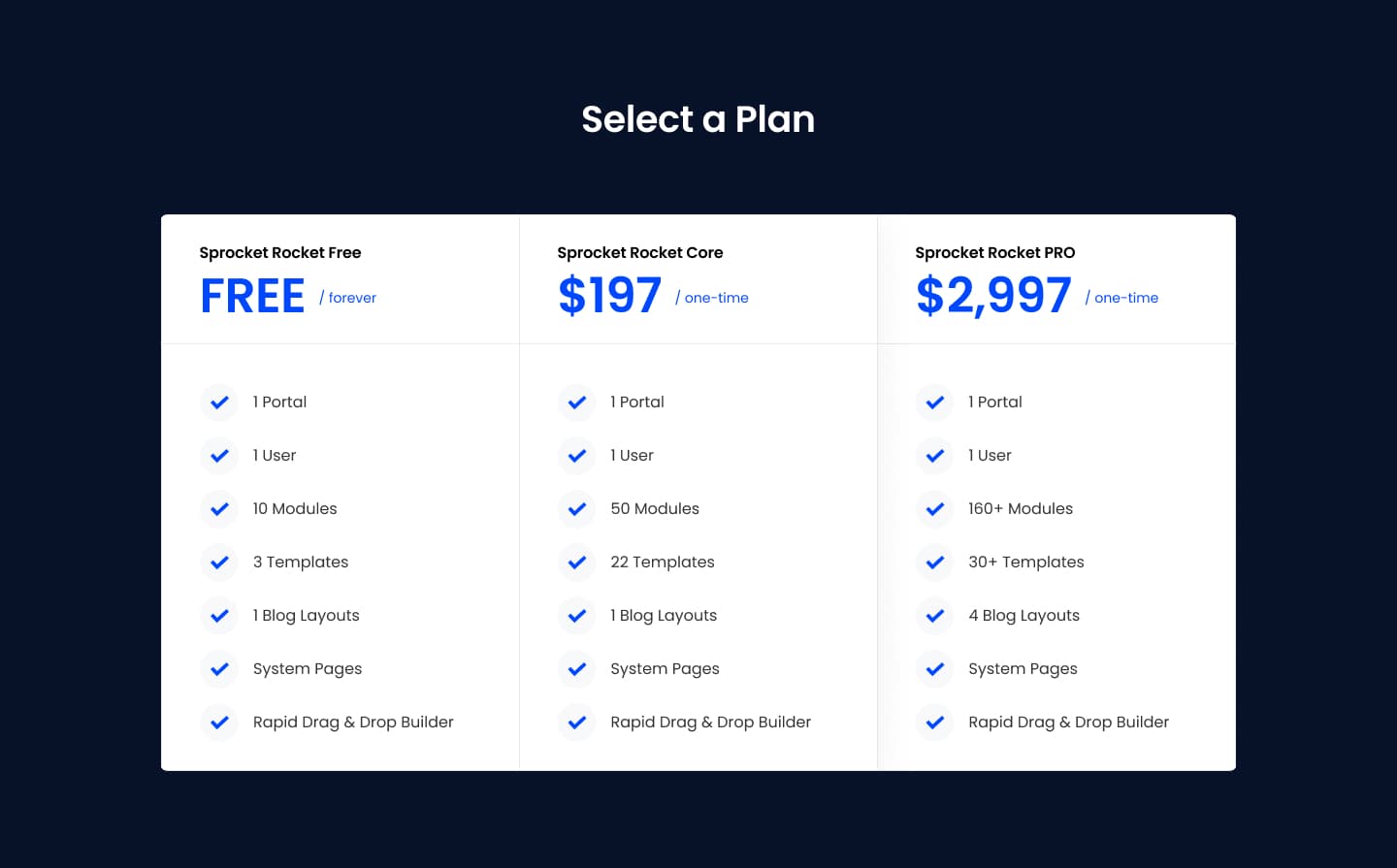
Pick it over SR Cards Pricing 01 when you do not need a price display or featured badge on each card, since this layout skips a dedicated price field and relies on the feature lines to convey plan details. Choose it over SR Cards Pricing 03 when you want three plans side by side for comparison rather than a single spotlighted package with a longer inclusions list.
Use cases
- Three-tier pricing table
- Plan comparison without prices
- Feature checklist per plan
- Subscription tier signup
- Service package options
- Simple pricing grid
Where it fits
- Included with: PRO
- Page sections: Pricing, Comparison, CTA
Editable fields
Content tab
| Field | Type | Notes |
|---|---|---|
| Background Video | File | Repeats: min 0, default 1. Add multiple file formats in order to provide compatibility with a broad range of browsers. |
| Background Video Tablet | File | Repeats: min 0, default 1. This background video will only be used on tablet devices. |
| Background Video Mobile | File | Repeats: min 0, default 1. This background video will only be used on mobile devices. |
| Enabled | Boolean | |
| ID | Text | Assign a ID to the module. |
| Class | Text | Assign a CLASS to the module. |
| Description | Rich text | |
| Lead Text | Boolean | Turn on to make the Description text larger. |
Heading Repeats: min 0, default 1.
| Field | Type | Notes |
|---|---|---|
| Heading | Text | |
| Size | Choice | HTML heading size. Options: H1, H2, H3, H4, H5, H6, P. |
| Display Size | Choice | Size that heading is displayed at. 12 options, including Auto, H1, H2. |
| Color | Choice | 15 options, including Auto, Primary, Secondary. |
| Color | Color | |
| Align | Choice | Options: Auto, Left, Center, Right. |
| CSS Class | Text |
Plan 1 Repeats: min 1, default 3.
| Field | Type | Notes |
|---|---|---|
| Link | Link |
Plan 1 › Heading Repeats: min 0, default 2.
| Field | Type | Notes |
|---|---|---|
| Heading | Text | |
| Size | Choice | HTML heading size. Options: H1, H2, H3, H4, H5, H6, P. |
| Display Size | Choice | Size that heading is displayed at. 12 options, including Auto, H1, H2. |
| Color | Choice | 15 options, including Auto, Primary, Secondary. |
| Color | Color | |
| Align | Choice | Options: Auto, Left, Center, Right. |
| CSS Class | Text |
Plan 1 › Features Repeats: default 7.
| Field | Type | Notes |
|---|---|---|
| Description | Rich text | |
| Lead Text | Boolean | Turn on to make the Description text larger. |
Plan 1 › Features › Icon
| Field | Type | Notes |
|---|---|---|
| Icon Type | Choice | Options: Icon, Image, Custom, None. |
| Image | Image | |
| Icon | Icon | |
| Icon Color | Color | |
| Icon Background | Color | Set opacity to 0 to disable the background. |
| HTML | Text | |
| Icon Size | Number | |
| Purpose | Choice | The purpose of the icon, used for accessibility. If set to decorative, an additional attribute of aria-hidden="true" will be added to the icon. Options: Decorative, Semantic. |
Plan 1 › Features › Heading Repeats: default 0.
| Field | Type | Notes |
|---|---|---|
| Heading | Text | |
| Size | Choice | HTML heading size. Options: H1, H2, H3, H4, H5, H6, P. |
| Display Size | Choice | Size that heading is displayed at. 12 options, including Auto, H1, H2. |
| Color | Choice | 15 options, including Auto, Primary, Secondary. |
| Color | Color | |
| Align | Choice | Options: Auto, Left, Center, Right. |
| CSS Class | Text |
Style tab
Change log
| Version | Change |
|---|---|
| 3.0.1 | Fixed featured heading custom color visibility |
| 3.0.0 | Stardust update |
| 2.2.0 | Accessibility improvements |
| 2.1.0 | Added responsive background options |
| 2.0.2 | Added new Link options |
| 2.0.1 | Added card styles |
SR Cards Pricing 01
This module renders a heading, optional description, and a row of three pricing cards, each showing a plan name, a price with optional prefix and suffix, a rich text feature list, an optional featured badge, and one CTA button.
SR Cards Pricing 03
This module renders a shared heading and description above a two column layout, with a single pricing card on the left showing a plan name, price, short description, and one CTA button, next to a features box on the right listing up to six feature lines each with an icon or image and its own subheading.