

SR Tabs Accordion 02
This module renders a heading and description above one or more accordion columns, each with its own subheading and up to three collapsible items that show a label and rich text answer.
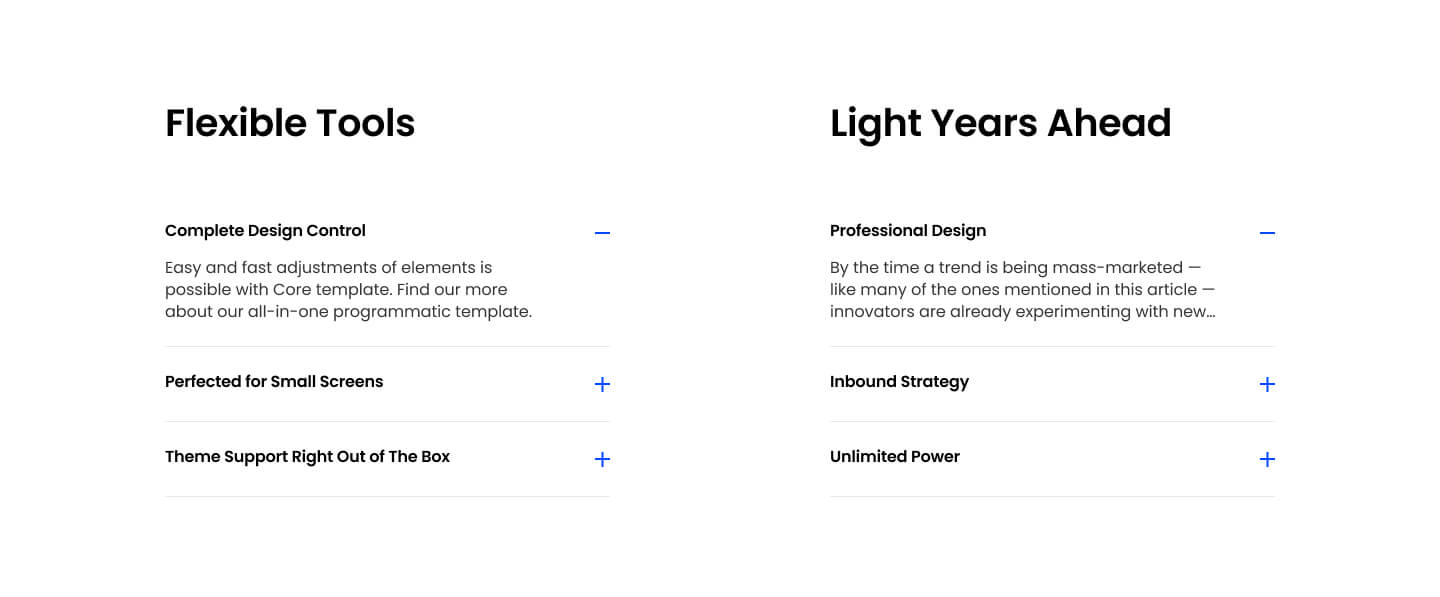
Choose it over SR Tabs Accordion 01 when you need multiple side by side accordion groups, for example splitting product questions into separate columns by topic, and when you want the option to keep only one item open at a time across the whole set. It expects short question style labels with fuller paragraph or list content in the answers, since each column groups its own topic rather than listing everything in one long stack.
Use cases
- Product questions split by topic
- Multi-column faq layout
- Feature breakdown by category
- Pricing plan details side by side
- Support topics grouped by product area
Where it fits
- Included with: Stack
- Page sections: FAQ, Features, Content
Editable fields
Content tab
| Field | Type | Notes |
|---|---|---|
| Background Video | File | Repeats: min 0, default 1. Add multiple file formats in order to provide compatibility with a broad range of browsers. |
| Background Video Tablet | File | Repeats: min 0, default 1. This background video will only be used on tablet devices. |
| Background Video Mobile | File | Repeats: min 0, default 1. This background video will only be used on mobile devices. |
| Enabled | Boolean | |
| ID | Text | Assign a ID to the module. |
| Class | Text | Assign a CLASS to the module. |
| Description | Rich text | |
| Lead Text | Boolean | Turn on to make the Description text larger. |
| Close Inactive Accordions | Boolean | Only shows the active Accordion. |
Heading Repeats: min 0, default 0.
| Field | Type | Notes |
|---|---|---|
| Heading | Text | |
| Size | Choice | HTML heading size. Options: H1, H2, H3, H4, H5, H6, P. |
| Display Size | Choice | Size that heading is displayed at. 12 options, including Auto, H1, H2. |
| Color | Choice | 15 options, including Auto, Primary, Secondary. |
| Color | Color | |
| Align | Choice | Options: Auto, Left, Center, Right. |
| CSS Class | Text |
Accordions › Heading Repeats: min 0, default 1.
| Field | Type | Notes |
|---|---|---|
| Heading | Text | |
| Size | Choice | HTML heading size. Options: H1, H2, H3, H4, H5, H6, P. |
| Display Size | Choice | Size that heading is displayed at. 12 options, including Auto, H1, H2. |
| Color | Choice | 15 options, including Auto, Primary, Secondary. |
| Color | Color | |
| Align | Choice | Options: Auto, Left, Center, Right. |
| CSS Class | Text |
Accordions › Accordion Item Repeats: min 0, default 3.
| Field | Type | Notes |
|---|---|---|
| Accordion Label | Text | |
| Accordion Content | Rich text | |
| Expanded | Boolean |
Accordions › Columns Repeats: min 1, max 4, default 1. Columns follow a twelve column grid.
| Field | Type | Notes |
|---|---|---|
| Column Breakpoint | Choice | Options: None, Mobile, Tablet, Desktop, XL. |
| Column Width | Choice | 12 options, including 1, 2, 3. |
| Column Offset | Choice | 13 options, including 0, 1, 2. |
| Column Order | Number |
Style tab
Change log
| Version | Change |
|---|---|
| 4.0.0 | Stardust update |
| 3.2.1 | Column breakpoint fix |
| 3.2.0 | Accessibility improvements |
| 3.2.0 | Added accordion styles |
| 3.1.0 | Added responsive background options |
| 3.0.2 | Added show one at a time option |
| 3.0.1 | Added right padding to the details summary |
| 3.0.0 | Removed jQuery |
SR Tabs Accordion 01
This module renders a two-column layout with a heading and description on the left and up to six expandable accordion items on the right, each with a label and rich text answer.
SR Tabs Horizontal 01
This module renders a horizontal tab set with up to five tabs, each nav button showing a small image (with optional hover image swap), title, subtitle and icon, next to a two-column detail panel with a heading, rich text, and a rounded side image.