

SR Bento Grid 01
Renders an asymmetric grid of up to 10 cards, each with independent column span, row span, and background, filled with any mix of image, video, form, meeting embed, lottie animation, heading, richtext, feature list, and CTA button.
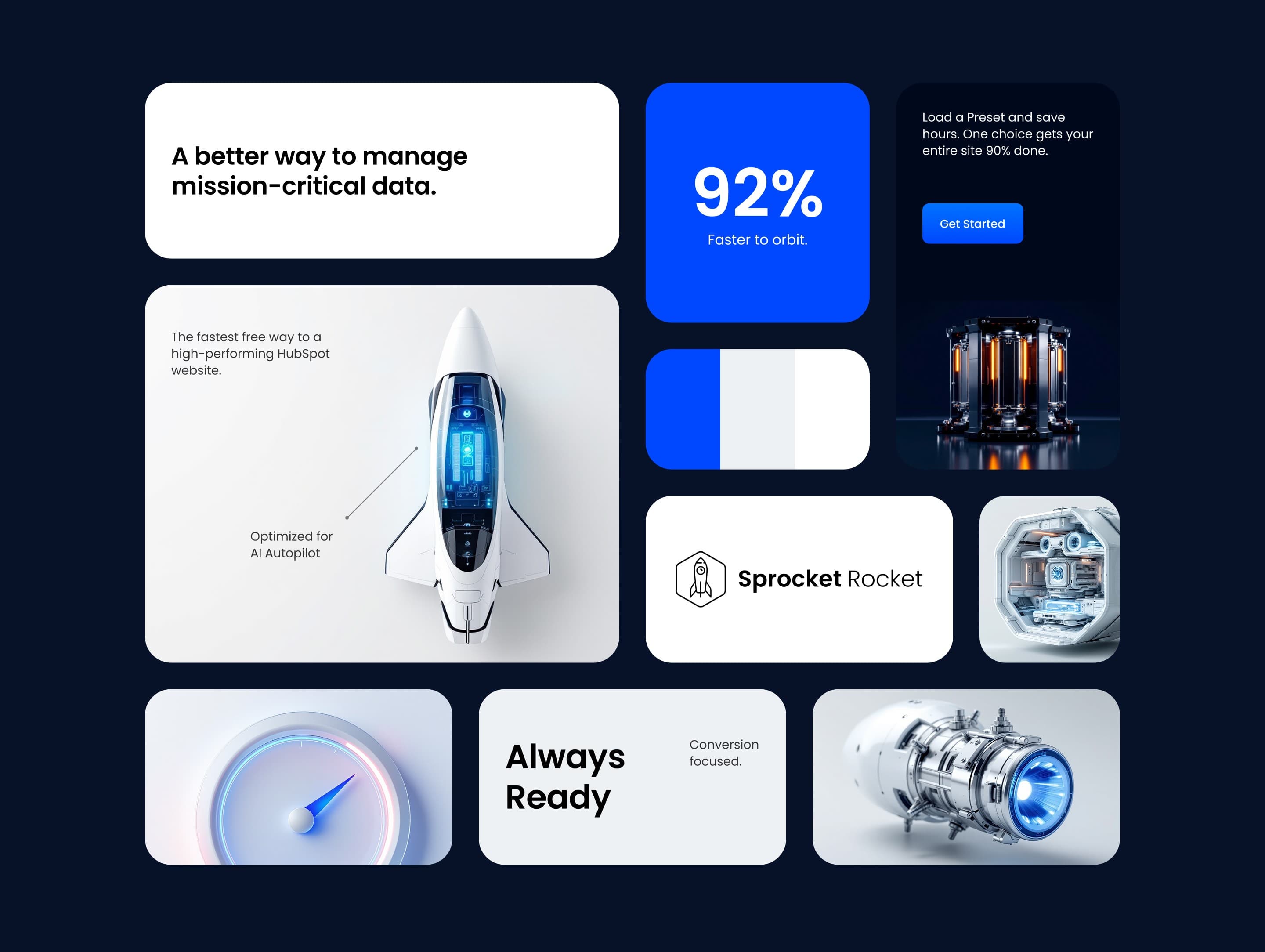
Pick this over the bling and clients modules when one section needs several different content types side by side, such as a form next to a video next to a feature list, rather than a single image, slider, or logo strip. Plan each cell's media and content ahead of time since image sizes, video files, and form or meeting assets are all configured per column.
Use cases
- Mixed-media feature grid
- Asymmetric bento layout
- Form next to video block
- Multi-format landing section
- Product showcase with embedded form
- Dashboard-style content grid
Where it fits
- Included with: PRO
- Page sections: Features, Benefits, Content
Editable fields
Content tab
| Field | Type | Notes |
|---|---|---|
| Background Video | File | Repeats: min 0, default 1. Add multiple file formats in order to provide compatibility with a broad range of browsers. |
| Background Video Tablet | File | Repeats: min 0, default 1. This background video will only be used on tablet devices. |
| Background Video Mobile | File | Repeats: min 0, default 1. This background video will only be used on mobile devices. |
| Enabled | Boolean | |
| ID | Text | Assign a ID to the module. |
| Class | Text | Assign a CLASS to the module. |
| Description | Rich text | |
| Lead Text | Boolean | Turn on to make the Description text larger. |
Heading Repeats: min 0, default 0.
| Field | Type | Notes |
|---|---|---|
| Heading | Text | |
| Size | Choice | HTML heading size. Options: H1, H2, H3, H4, H5, H6, P. |
| Display Size | Choice | Size that heading is displayed at. 12 options, including Auto, H1, H2. |
| Color | Choice | 15 options, including Auto, Primary, Secondary. |
| Color | Color | |
| Align | Choice | Options: Auto, Left, Center, Right. |
| CSS Class | Text |
Grid Items Repeats: default 10.
| Field | Type | Notes |
|---|---|---|
| Label | Text | |
| Media Type | Choice | Options: Image, Video, Form, Meeting, Lottie, None. |
| Add to Lightbox | Boolean | Enable this toggle to add this image to a lightbox pop-up. |
| Image | Image | |
| Media Corner Radius | Number | |
| Image Link | Link | |
| Banner Image | Boolean | |
| Banner Height | Number | |
| Full Width Image | Boolean | Stretch image to full width of the column. |
| Lottie Embed Code | Text | How to add LottieFiles. |
| Meeting | Meeting | |
| Content | Rich text | |
| Lead Text | Boolean | Turn on to make the content text larger. |
| Full Card Link | Boolean | If enabled, the link will be applied to the entire card. |
| Link | Link | |
| Aria Label | Text | |
| CSS Class | Text | Assign a CLASS to the column. |
Grid Items › Styles
| Field | Type | Notes |
|---|---|---|
| Elements Order | Choice | Options: Headings, Media, Description, Features, CTAs. |
| Element Gap | Number | |
| Media Bleed | Number | Define the media bleed area. This controls how much the media extends beyond the content. A larger value creates a greater bleed. |
| Background | Choice | 18 options, including Auto, Primary, Secondary. |
| Background Color | Color | |
| Background Image | Image | |
| Image Size | Choice | Options: Resize to show entire image, Resize to fill container, Display full size. |
| Image Alignment | Choice | 9 options, including Top-left, Top-center, Top-right. |
| Background Overlay Color | Color | |
| Backdrop Blur | Number | |
| Text Align | Choice | Options: Auto, Left, Center, Right. |
| Text Color | Choice | 15 options, including Auto, Primary, Secondary. |
| Text Color | Color | |
| Shadow | Boolean | |
| Horizontal | Number | A positive value puts the shadow on the right side of the box, a negative value puts the shadow on the left side of the box. |
| Vertical | Number | The vertical offset of the shadow. A positive value puts the shadow below the box, a negative value puts the shadow above the box. |
| Blur | Number | The blur radius. The higher the number, the more blurred the shadow will be. |
| Spread | Number | The spread radius. A positive value increases the size of the shadow, a negative value decreases the size of the shadow. |
| Inset | Boolean | Changes the shadow to an inner shadow. |
| Color | Color | The color of the shadow. |
| Hide Overflow | Boolean |
Grid Items › Styles › Features Styles
| Field | Type | Notes |
|---|---|---|
| Style | Choice | Options: Grid, List. |
| Item Width | Number | |
| Gap | Number | |
| Icon Alignment | Choice | Options: Top, Center, Bottom. |
Grid Items › Styles › Background Gradient
| Field | Type | Notes |
|---|---|---|
| Direction | Choice | Options: Bottom to top, Top to bottom, Right to left, Left to right, Top left to bottom right, Top right to bottom left. |
| Color | Color | Repeats: default 2. |
Grid Items › Styles › Padding
| Field | Type | Notes |
|---|---|---|
| Top | Number | |
| Bottom | Number | |
| Left | Number | |
| Right | Number |
Grid Items › Styles › Border
| Field | Type | Notes |
|---|---|---|
| Style | Choice | Options: Gradient One, Gradient Two, None, Solid, Dotted, Dashed, Double. |
| Color | Color | |
| Width | Number | |
| Radius | Number | |
| Top | Boolean | |
| Bottom | Boolean | |
| Left | Boolean | |
| Right | Boolean |
Grid Items › Styles › Card hover
| Field | Type | Notes |
|---|---|---|
| Background | Choice | 17 options, including Auto, Primary, Secondary. |
| Background Color | Color | |
| Text Color | Choice | 15 options, including Auto, Primary, Secondary. |
| Text Color | Color | |
| Shadow | Boolean | |
| Horizontal | Number | A positive value puts the shadow on the right side of the box, a negative value puts the shadow on the left side of the box. |
| Vertical | Number | The vertical offset of the shadow. A positive value puts the shadow below the box, a negative value puts the shadow above the box. |
| Blur | Number | The blur radius. The higher the number, the more blurred the shadow will be. |
| Spread | Number | The spread radius. A positive value increases the size of the shadow, a negative value decreases the size of the shadow. |
| Inset | Boolean | Changes the shadow to an inner shadow. |
| Color | Color | The color of the shadow. |
Grid Items › Styles › Card hover › Background Gradient
| Field | Type | Notes |
|---|---|---|
| Direction | Choice | Options: Bottom to top, Top to bottom, Right to left, Left to right, Top left to bottom right, Top right to bottom left. |
| Color | Color | Repeats: default 2. |
Grid Items › Styles › Card hover › Border
| Field | Type | Notes |
|---|---|---|
| Style | Choice | Options: Gradient One, Gradient Two, None, Solid, Dotted, Dashed, Double. |
| Color | Color | |
| Width | Number | |
| Radius | Number | |
| Top | Boolean | |
| Bottom | Boolean | |
| Left | Boolean | |
| Right | Boolean |
Grid Items › Layout Options Repeats: min 1, max 4, default 1.
| Field | Type | Notes |
|---|---|---|
| Column Breakpoint | Choice | Select the screen size breakpoint where these column settings will apply. Options: None, Mobile, Tablet, Desktop, XL. |
| Column Span | Choice | Choose how many columns this element should span horizontally. If the grid has 12 columns total, a span of 6 would take up half the width. 12 options, including 1, 2, 3. |
| Row Span | Choice | Choose how many rows this element should span vertically. Higher values will make the element taller. 12 options, including 1, 2, 3. |
| Custom Height | Boolean | Enable this to set a specific height for this column instead of using the default auto-sizing behavior. |
| Custom Content Width | Boolean | Enable this to control the width of the content within this column. |
| Height | Number | |
| Content Width | Number | |
| Direction | Choice | Choose the layout direction for content within this column. Vertical stacks content top to bottom, while Horizontal arranges content left to right. Options: Vertical, Horizontal. |
| Horizontal Alignment | Choice | Control how content is aligned horizontally within this column. Options: Start, Center, End, Stretch. |
| Vertical Alignment | Choice | Control how content is aligned vertically within this column. Options: Start, Center, End, Stretch. |
Grid Items › Video
| Field | Type | Notes |
|---|---|---|
| Video type | Choice | Options: Embed, HTML Video, HubSpot Video. |
| HubSpot Video | Video player | |
| Embed | Embed | |
| Custom Thumbnail | Image | |
| Video File | File | Repeats: default 1. Add multiple file formats in order to provide compatibility with a broad range of browsers. |
| Video Poster | Image | |
| Show Controls | Boolean | |
| Play Button Color | Color | |
| Play Button Background Color | Color | |
| Autoplay | Boolean | |
| Loop | Boolean | |
| Muted | Boolean | |
| Video Accent | Choice | Add a design accent behind your video. Options: None, Design 1, Design 2, Design 3. |
| Video Accent Color | Choice | 11 options, including Primary, Secondary, Tertiary. |
| Custom Accent Color | Color |
Grid Items › Video › Style Options
| Field | Type | Notes |
|---|---|---|
| Play button color | Color |
Grid Items › Video › Placeholder text
| Field | Type | Notes |
|---|---|---|
| Video placeholder title | Text | |
| Video placeholder description | Text |
Grid Items › Form
| Field | Type | Notes |
|---|---|---|
| Enabled | Boolean | |
| Description | Rich text | |
| Lead Text | Boolean | Turn on to make the Description text larger. |
| Form | Form | |
| Send form notifications to specified email addresses instead of the form defaults | Boolean | |
| Email Addresses | ||
| Salesforce campaign | Salesforcecampaign |
Grid Items › Form › Styles
| Field | Type | Notes |
|---|---|---|
| Background Color | Color | |
| Text Color | Choice | Set to Auto to use the default text color. Set to Custom to set a custom text color. 15 options, including Auto, Primary, Secondary. |
| Text Color | Color | |
| Hide Field Labels | Boolean |
Grid Items › Form › Styles › Fields
| Field | Type | Notes |
|---|---|---|
| Style | Choice | Options: Default, Custom. |
| Height | Number | |
| Background Color | Color | |
| Border Color | Color | |
| Size | Number | |
| Radius | Number | |
| Focus | Color | |
| Field Color | Color | |
| Placeholder | Color |
Grid Items › Form › Styles › Button
| Field | Type | Notes |
|---|---|---|
| Style | Choice | 25 options, including Primary, Secondary, Tertiary. |
| Size | Choice | Options: Small, Default, Large. |
| Align | Choice | Options: Auto, Left, Center, Right. |
| Full Width | Boolean |
Grid Items › Form › Styles › Padding
| Field | Type | Notes |
|---|---|---|
| Top | Number | |
| Bottom | Number | |
| Left | Number | |
| Right | Number |
Grid Items › Form › Styles › Border
| Field | Type | Notes |
|---|---|---|
| Style | Choice | Options: Gradient One, Gradient Two, None, Solid, Dotted, Dashed, Double. |
| Color | Color | |
| Width | Number | |
| Radius | Number | |
| Top | Boolean | |
| Bottom | Boolean | |
| Left | Boolean | |
| Right | Boolean |
Grid Items › Form › Styles › Shadow
| Field | Type | Notes |
|---|---|---|
| Shadow | Boolean | |
| Horizontal | Number | A positive value puts the shadow on the right side of the box, a negative value puts the shadow on the left side of the box. |
| Vertical | Number | The vertical offset of the shadow. A positive value puts the shadow below the box, a negative value puts the shadow above the box. |
| Blur | Number | The blur radius. The higher the number, the more blurred the shadow will be. |
| Spread | Number | The spread radius. A positive value increases the size of the shadow, a negative value decreases the size of the shadow. |
| Inset | Boolean | Changes the shadow to an inner shadow. |
| Color | Color | The color of the shadow. |
Grid Items › Form › Heading Repeats: min 0, default 1.
| Field | Type | Notes |
|---|---|---|
| Heading | Text | |
| Heading Size | Choice | HTML heading size. Options: H1, H2, H3, H4, H5, H6, P. |
| Heading Display Size | Choice | Size that heading is displayed at. 12 options, including Auto, H1, H2. |
| Heading Color | Choice | 15 options, including Auto, Primary, Secondary. |
| Heading Color | Color | |
| Heading Align | Choice | Options: Auto, Left, Center, Right. |
| CSS Class | Text |
Grid Items › Heading Repeats: min 0, default 1.
| Field | Type | Notes |
|---|---|---|
| Heading | Text | |
| Size | Choice | HTML heading size. Options: H1, H2, H3, H4, H5, H6, P. |
| Display Size | Choice | Size that heading is displayed at. 12 options, including Auto, H1, H2. |
| Color | Choice | 15 options, including Auto, Primary, Secondary. |
| Color | Color | |
| Align | Choice | Options: Auto, Left, Center, Right. |
| CSS Class | Text |
Grid Items › Features Repeats: default 0.
| Field | Type | Notes |
|---|---|---|
| Description | Rich text | |
| Lead Text | Boolean | Turn on to make the Description text larger. |
Grid Items › Features › Icon
| Field | Type | Notes |
|---|---|---|
| Icon Type | Choice | Options: Icon, Image, Custom, None. |
| Image | Image | |
| Icon | Icon | |
| Icon Color | Color | |
| Icon Background | Color | Set opacity to 0 to disable the background. |
| HTML | Text | |
| Icon Size | Number | |
| Purpose | Choice | The purpose of the icon, used for accessibility. If set to decorative, an additional attribute of aria-hidden="true" will be added to the icon. Options: Decorative, Semantic. |
Grid Items › Features › Heading Repeats: default 1.
| Field | Type | Notes |
|---|---|---|
| Heading | Text | |
| Size | Choice | HTML heading size. Options: H1, H2, H3, H4, H5, H6, P. |
| Display Size | Choice | Size that heading is displayed at. 12 options, including Auto, H1, H2. |
| Color | Choice | 15 options, including Auto, Primary, Secondary. |
| Color | Color | |
| Align | Choice | Options: Auto, Left, Center, Right. |
| CSS Class | Text |
Grid Items › CTA Repeats: min 0, default 1.
| Field | Type | Notes |
|---|---|---|
| CTA Type | Choice | Options: HubSpot CTA, HubSpot Payment, Button, Modal. |
| CTA Style | Choice | 26 options, including Primary, Secondary, Tertiary. |
| CTA | CTA | |
| Button Text | Text | |
| Modal Target | Text | |
| Link | Link | |
| Payment link | Payment | |
| Checkout behavior | Choice | Options: Open in a new tab, Sliding overlay. |
| CTA Size | Choice | Options: Small, Default, Large. |
| Add icon | Boolean |
Grid Items › CTA › Default
| Field | Type | Notes |
|---|---|---|
| Background | Color | |
| Text | Color | |
| Border | Color |
Grid Items › CTA › Hover
| Field | Type | Notes |
|---|---|---|
| Background | Color | |
| Text | Color | |
| Border Color | Color |
Grid Items › CTA › Icon
| Field | Type | Notes |
|---|---|---|
| Icon | Icon | |
| Position | Choice | Options: Left, Right. |
| Purpose | Choice | The purpose of the icon, used for accessibility. If set to decorative, an additional attribute of aria-hidden="true" will be added to the icon. Options: Decorative, Semantic. |
Style tab
Change log
| Version | Change |
|---|---|
| 1.0.1 | Removed theme color inheritance |
| 1.0.0 | Release |